
 281-860-7210 or
  Email
Email

Local, Long Distance
and International Calling
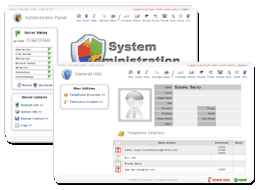
Intuitive Web Interface

One number reaches you anywhere

Satisfaction guaranteed
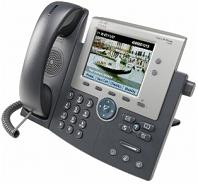
Digital Phones

Houston based to serve you better

Remote workers and Branch offices

Here to help with your business and technology needs
Televonics Phone System Features
Contact Televonics for a custom assessment.
Determine the exact features your company could benefit from.
Call: 281-860-7210 or Email
Interactive Voice Response/Automated attendant
Interactive voice response allows the caller to have two-way interaction with your Televonics system by selecting options from pre-recorded voice prompts (for example "push 1 for sales", etc). The IVR can be used to "lookup" extensions of your employees or departments. Or use the IVR system to identify what service the caller wants, direct calls to the appropriate department, provide answers to simple questions such as account balances, allow pre-recorded information to be heard or gather numeric information such as account numbers to pass to agents IVR systems can be used to create and manage many services including telephone banking, order placement, caller identification and routing, balance inquiry, and reservations. With IVR, you can even send callers to different parts of the voice response based on their caller IDs (for example, send your best customers directly to your best sales). Unfortunately, poor design and lack of appreciation of the callers' needs has caused much criticism of IVR systems. However, Televonics helps you to properly design an IVR system your customers will appreciate and allow them to connect to their desired service promptly and with a minimum of fuss.
Music-on-Hold With or Without Informational Announcements
When you have to place your customers on hold, studies show they prefer, and will be more patient and satisfied, if you give them something to listen to. Televonics can add to your system some soothing music files or you may upload your own custom files. Further increase your customer's satisfaction by providing information on hold, which might include general information customers would find interesting. Or the system could be configured to play commercial/advertisements about your business or other details about your business you want your customer to know. From the Televonics interface, you can specify the frequency of the messages that come on during the music on hold and even play different messages for different classes of callers. Music-on-hold features also are available when transferring a caller or placing the caller in a call queue.
Find-Me /Follow Me
Simplify your busy life and always be in-touch. With Televonics find-me technology, give callers a single phone number and let the system find you at whatever phone number you are at. Find-Me can be thought of as intelligent call forwarding where the Televonics system will ring your office phone, cell phone, home phone or any phone number of your choosing in an attempt to find you. With Televonics automation working for you, you'll never miss a call, but if for some reason you decide not to take the call, the system will automatically ring back to voicemail. This way, if you do miss a call, all messages will be located in your one voicemail box and not spread out to all you other phones. Televonics gives you the power to customize how you want people to find you - ring all your selected phones at once or ring them in a specific order for a set period of time. Of course you can set this feature along with our scheduler so it will perform this function only during the times you desire and on the days you desire.
Webcall
Let your customers call you from your website. Webcall sends the caller's Caller ID, and caller name with each call so your representatives know instantly who is calling.
Voicemail:
If you can't get to you phone in time or because you are away from your desk, callers can leave you a voice message on the voicemail system. Greet your customers with custom recorded voicemail greetings. After a message is left, you will be notified of the waiting voice mail in one of more of the numerous ways you choose:
- MWI (message waiting indicator) on all the phones we carry
- Audible chime from your phone every so often
- Email notification
- Message notification sent to a pager
- Notification on the web interface
And Televonics allows you to easily access any of your messages with:
- One touch from your office phone
- Dial in remotely from any phone (protected with a PIN code access)
- Visual voicemail
- Voicemail to Email (V-email)
Televonics makes returning calls from voicemail even easier. Pressing # during the voicemail will cause the system to dial the phone number of the person that left the voicemail and connect you to them. You can do this from any phone you are on and traveling employees will find this particularly useful and convenient.
Software Upgradeable
We designed the Televonics system to be completely software upgradeable meaning your Televonics investment is protected as much as possible from technological obsolescence. Not only that, software updates and upgrades improve the functions and features of your system. The updates and upgrades are remotely updated in your system so you won't ever have to worry about a thing.
Visual Voicemail
Now you can conveniently manage your voicemail from your web browser. The Televonics visual interface allows you to quickly see all of your voicemails on one page (who called, what their number is, when they called and how long their message is) and even listen to the messages right there from the interface. Also, return a call right there from the interface - just click on the contact and the system initiates the call. The interface allows you to delete voicemail right there on the spot or move them to separate folders. The ability to organize your voicemails visually is a feature you are sure to enjoy and appreciate. Now you can organize your voicemail into separate folders just as you would save documents on your computer. This gets the voicemails you want to save out of the way and lets you organize them for easy access in the future or pass them on to other extensions.
Call Quality
Call quality in VoIP is often neglected and sacrificed with VoIP. But Televonics doesn't cut corners and uses the best quality conversion format when converting voice to digital format to ensure the voice quality sounds as if you were in the same room. If VoIP voice quality issues do arise, patented monitoring technology causes an uninterrupted fail over (even mid conversation) to traditional phone lines.
Automatic Scheduler
Automatically redirect calls or play different messages depending on the time of the day or day of the week. For examples, come closing time, no need to manually change your recording or redirect your phones, the Televonics system does it automatically at the times and days you specify. Combine this feature along with the follow-me feature to direct calls to the phones you want, on the days you want and during the times you want. Set it up one time and from then on out the automated system will take care of the rest.
Custom/Recordable Voice Prompts
You have full control to allow you to make Interactive Voice Response (IVR), greetings and voicemail prompts you want your customers to hear. Using the built-in recorder you can generate the voice prompts with a telephone or simply upload sound files to the system through the Televonics configuration interface.
Virtual numbers
Get phone numbers from other regions of the country and tie them into your main line. A simple way to expand the areas you serve and provide your customers a convenient way to reach you.
Teleconference (Call conferencing/Conference Bridge)
With a Televonics system you can get a group together over the phone and meet via teleconference. Teleconferencing works well when you need to reduce you costs or time just won't allow getting a group together for a face to face meeting. The teleconference feature supports an unlimited number of internal participants and as many external participants as you have phone lines. You may set up any number of conference rooms on the PBX and you may protect them by a PIN code. Enter the conference by simply calling into the conference room or transfer external participants to the conference number
Upgrades
Televonics makes it possible to upgrade the system easily and without interruption. Because we employ a revolutionary software architecture you will always be kept up to date with the simple software upgrade.
System Restore, Backup and Recovery
What good is powerful phone system if you are too worried you'll make a mistake while changing something? Well you need not fear because Televonics has not only made it hard to make a mistake but if you do we've made it simple to return to a previous working configuration with the push of a button. Before starting your changes, you can manually backup the current state or simply rely on the automatically scheduled backups the system takes. These automatic backups also provide Televonics support engineers a method to quickly recover your system and get it back up and working in the unlikely event other failures make it necessary.
Simple and Intuitive Web Based Configuration Interface
Televonics has worked hard and successfully made a concise, simple and intuitive interface to the phone system that stands out ahead of any competition. The Televonics interface makes it easy to take advantage of the numerous features available to you. And being a web based interface means you can change configurations not only in the office, but anywhere you can find a computer connected to the internet. To make things even easier, Televonics provides your system preconfigured to meet your needs based on a personalized interview with your business. And Televonics will always be there to help you get more out of your system and help you with any changes you want to make. Changes can be made on two levels:1) administration interface which handles company wide settings such as the interactive voice settings, and 2) a user interface for individual users, allowing them to customize their personal phone configurations (voicemail settings, Caller ID, call log, etc.) . Your employees will be glad to be able to finally customize their phone to the way that works best for them.
Toll Free Numbers
Your company can have its own 800, 888, 866, etc toll free phone number. Make it easy and convenient for you customers to choose to call you by adding a toll free number.
Telecommuters/Branch office
Your phones can work anywhere in the world. This functionality makes it possible for your branch office or telecommuters to appear physically located in the same office but might actually be a world apart. With a Televonics system, your branch offices and telecommuters will enjoy the exact same system benefits and functionality you do back in the main office. In fact, calls between any phones on your Televonics system are free. Users can even change the features on their phone remotely using our web interface.
Paging and Intercom
Need to notify someone they have a call or are needed but don't know exactly where they are - Page them from your phone. Need to talk to a single person - Use the intercom mode. With a Televonics system and phones supporting this feature, you can page system wide (group) or use the intercom to talk hands free with another person. This way, you can tell all your colleagues "we're going out to lunch now" as a group and then turn around and talk to only your secretary to ask them if they would call the restaurant and make reservations. This feature even works with your remote workers connected to the Televonics system. If you are in a warehouse or other type environment where overhead paging would be more appropriate, Televonics can support that as well.
911 (Emergency Dialing)
911 dialing service connects you with emergency operators incases of emergency
Reliability
Your phones are critical to your business and with a Televonics system your phones will be more reliable than your current phone lines so service will continue without interruption. Televonics achieves this feat by using a dissimilar redundancy scheme and failover technology. Televonics designed the system so any single failure won't cause an interruption in service. Furthermore, Televonics systems are regression tested and subjected to extreme stress conditions by test equipment that simulates hundreds of calls in various real-world combinations and configurations.
Transfer Calls (two different ways to do it)
There are two different ways to transfer a call to another phone whether it is to an office extension or any other phone number: Assisted or blind.
Assisted - stay with the person that called until you have made contact with the person you are attempting to transfer to and then complete the transfer with a push of the button.
Blind - dial the number you wish to transfer the caller to and send them off without knowing if the other end will pick up.
Voicemail to Email (V-email)
Televonics integrates voicemail and email together so that any voicemail you receive can be automatically emailed to your self. You can even specify the system to email the message to any other email (for example a secretary).
Voicemail Groups
Send voice message to multiple people or groups (such as sales, marketing, etc.) by dialing an extension and leaving a message (which then gets delivered to those in the group).
Automated System Monitoring
Televonics has powerful telephone and operating system monitoring software built in as a key part of the architecture. Hardware and phone functions as well as call quality are all monitored to make sure everything works and quality is maintained. Many problems are detected, diagnosed and fixed without the need for intervention; however, if an issue needing attention is detected, notification is sent to Televonics engineers so the issue may be resolve before it could ever become a significant problem. Rest assured your system is always checking itself 24/7/365 to ensure proper operation.
Robust/Versatile
A Televonics system has been engineered to work in many different environments and under different network configurations
Call Queues and Parking
Call queues takes incoming calls, greets the caller with a custom announcement and places them in a line with other callers to wait for the next available agent to take the call. While the customer waits in the queue, music on hold makes the wait a little more pleasant, and the "hold time" announcement lets them know they are making progress and keeps them on the line. To ensure the caller isn't forgotten customizable hold time limits ensure callers don't remain in the queue for extended periods of time. Call distribution to your agents can be accomplished via ring all, round robin, fewest calls and least recently called. Televonics also allows for agent/user prioritization for more effective call routing.
Incoming Caller ID Display
Incoming caller ID displays automatically on all phones. When you don't feel like turning around and looking at your phone, Televonics can configure the computer you are on to show/pop-up the caller ID and information of the incoming call.
Keep your current phone number
We can move (port) your phone number from your current service to ours.
Mobile Workers
The Mobile Worker feature allows your mobile workers to stay connected to the main telephone system when they are out of the office. For example if you have service technicians that travel to customer locations they may have a significant amount of down time while driving from customer to customer. The Mobile Worker feature allows users to dial the Televonics phone system (from a cell phone or any other phone) and "log in". The system then treats the phone they logged in from as an extension allowing them to stay connected. The remote user can then accept incoming calls as if they were sitting in the main office.
Direct Inward Dial (DIDs)
To complement your corporate number, give your employees a personal number that will dial directly to their phone. And accomplish all this without adding the additional expense of more phone lines
Call Distribution
ACD (Automatic Call Distribution) allows you to route incoming calls to your employees/agents in many different ways to suit your business needs:
- Ring all - 1st to pick up gets the call.
- Ring one person at a time in order (round robin)
- Ring in a specific order (sequential)
Ring-all
Takes one inbound call and ring all phones in a particular group such as the company sales department. The first one to pick up the call gets it.
Call Recording
Record a phone conversation or a conference to document your meeting or use the recording as a tool to improve employee performance and customer service. With a click of the button from the Televonics Interface you can manually initiate a recording. You can even choose to automatically record a specific number of conversations or record them at random. After completing the recording, the file is placed in your voice mail box where you have easy access to it, file it away or send it to others.
Do-Not-Disturb
For those important times when you don't want to be disturbed, users can activate the Do-Not-Disturb feature by pushing a button on their phone, dialing in and activating it with a phone code or by activating this feature from the Televonics control panel.
Automated Company Directory Assistance
Present you clients with a directory option where they may find the employee's extension and then have the system automatically connect them. The caller finds the employee's or department's extension by entering the first three letters of the employee's last name (or first name). If you don't want certain names in the directory, the system administrator may easily exclude those extensions.
Busy Auto Redial
Want to get through as fast as possible to a busy number but don't want to have to continuously redial? Televonics has automated this process and will keep trying the busy number until it gets through. Once it does your phone will ring you back and connect you. Each user can specify what they consider getting through - ringing or answered and the length of time they want to the phone to keep trying for.
Business Moves
A Televonics system makes office moves seamless and simple. Just take the Televonics server and phones with you to your new location, plug it in, connect the phones and you are back in business. The system is totally portable and doesn't care where it is located.
Survivability
In the unfortunate event you ever have to relocate due to a natural disaster, your employees may be dispersed but you can remain in touch with them and your customers. Lives may be disrupted temporarily but your communications and business don't have to be. Owning a Televonics system will mean you have a few less things to worry about during a stressful time.
Custom Caller-IDs
Customize your outbound caller-ID on a per-extension basis or set it to show your company name and main phone number.
Blacklist
From your incoming call log or your voicemail page, all it takes is one click to blacklist a number and prevent them from bothering you again. You can choose to handle those incoming blacklisted calls by either sending them of to your secretary, another phone or even simply drop the call. To take the caller off your black list, all you do is take the blacklisted name off the blacklist page with one simple click.
Call Hold
The system allows you to put customers on hold. So you always remember that valuable customer is still waiting on hold, certain phone models will ring the phone back after a certain amount of time. Televonics allows the hold ring back timer to be adjustable by the phone owner.
Contact Televonics for a custom assessment to determine the exact benefits your company would enjoy.
Call: 281-860-7210 or Email
"We we're amazed with all we could do with a Televonics phone system"